Multi-Company Control Panel
This manual describes, in a functional way and without going into technical aspects, the use of the multi-company solution implemented on Microsoft Dynamics 365 Business Central. The objective is to provide Financial and Administrative Directors with a clear guide to interpret the information, navigate through the different pages and use the key options (multi-company panel, control of collections and payments, eliminations, manual entries, etc.).
Throughout the document, references to standard and custom Business Central pages are used, but always from the point of view of use: what each screen shows, what decisions it facilitates, and how the information should be interpreted. Included are bookmarks for screenshots and chart suggestions that the finance or BI team can incorporate later.
The following menu has been created:
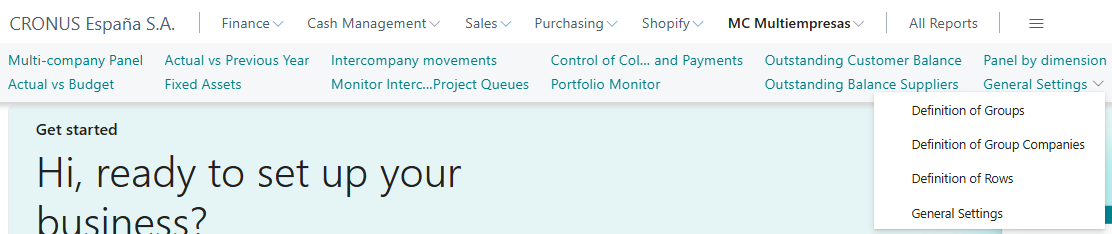
From which you can access the following screens:
Multi-Company Panel
Real vs Budget
Fixed Assets
Intercompany Movements
Monitor IC Trays and Project Queues
Collection and Payment Control
Portfolio Monitor
Outstanding balance of customers
Outstanding Balance of Vendors
Panel by dimensions
Configurations
Definition of Groups
Definition of Component Companies of the groups
Defining Rows
General Settings